Message Status
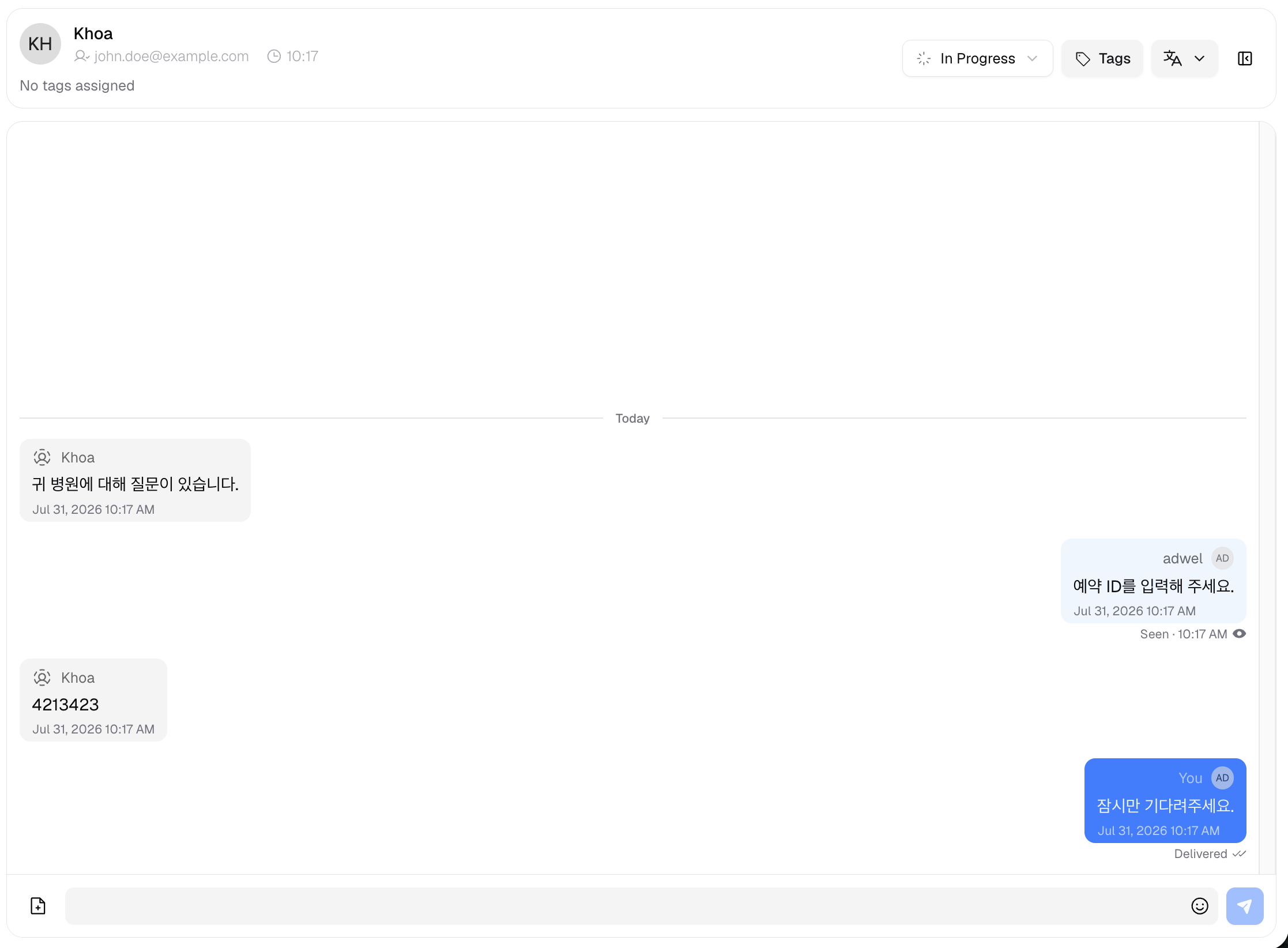
Message Status lets you see whether the patient has received and read the messages you send from the Live Chat. It appears below your messages in the Message Area, so you always know how far the patient has followed the conversation.
Statuses
There are three statuses, shown as the message progresses:
-
Sent — a single check (✓). Your message has been sent and saved, but the patient's chat is not currently open, so it has not reached their device yet.
-
Delivered — a double check (✓✓). The patient's chat has received your message, but they have not opened (read) it yet.
-
Seen — an eye icon with a timestamp (for example, Seen · 3:42 PM). The patient has read your message; the time shows when it was read.
Where it appears
- Sent and Delivered appear under your latest message.
- Seen appears under the last message the patient has read. If you send new messages after that, the newer messages show Sent or Delivered, while the Seen marker stays on the last message the patient actually read.
Only one status is shown per message.
Availability
Message Status is available only for chats that take place in the MChat widget or web chat — patients messaging directly through your hospital's MChat channel.
It is not available for conversations that come through external integrations such as LINE, Naver, or KakaoTalk, because those platforms do not provide read information to MChat. For those channels, no status is shown.