왼쪽 패널
왼쪽 패널에는 MChat 플랫폼의 다양한 섹션과 기타 정보에 액세스할 수 있는 기본 탐색 메뉴가 포함되어 있습니다.
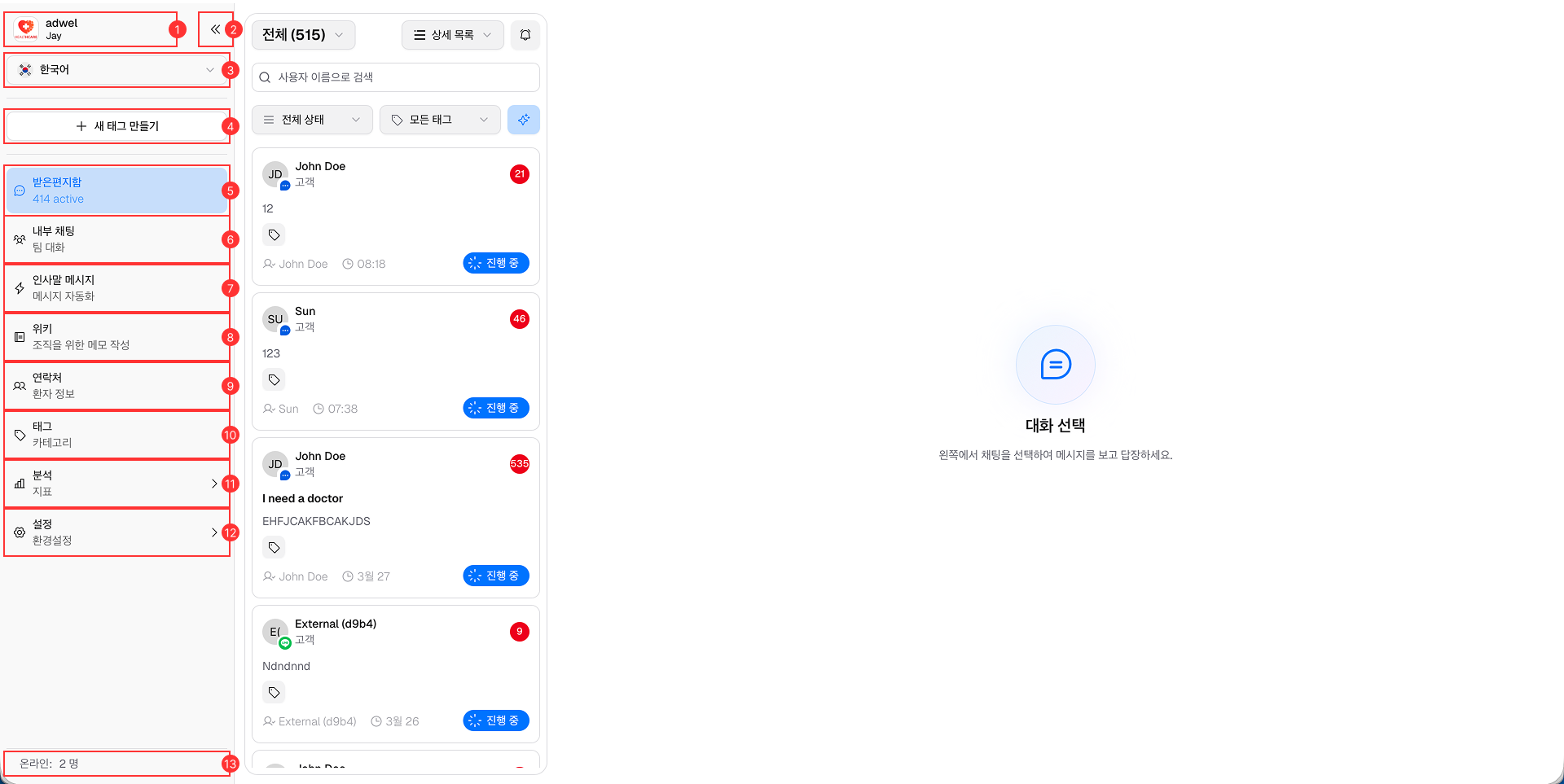
- 조직 정보: 표시됩니다.
- 조직 이름 및 로고.
- 에이전트는 이름 계정으로 로그인했습니다.
-
최소화/확장 버튼: 에이전트가 더 나은 화면 공간 관리를 위해 왼쪽 패널을 축소하거나 확장할 수 있습니다.
-
표시 언어 선택기: 상담원이 플랫폼 인터페이스에 대해 선호하는 언어를 선택할 수 있습니다.
-
새 태그 만들기 버튼: 상담원이 연락처와 채팅을 구성하기 위해 새 태그를 만들 수 있습니다.
-
받은 편지함: 상담원이 수신 메시지를 보고 관리할 수 있는 받은 편지함에 액세스합니다.
-
내부 채팅: 팀 커뮤니케이션을 위한 내부 채팅 기능에 액세스합니다.
-
인사말 : 인사말 메시지 설정에 접근합니다.
-
Wiki: 메모 작성 및 정보 저장을 위해 내부 Wiki에 액세스합니다.
-
연락처: 연락처 관리 섹션에 접근합니다.
-
태그: 태그 관리 섹션에 액세스합니다.
-
분석: 비즈니스 성과 통찰력을 얻기 위해 분석 대시보드에 액세스합니다.
-
설정: 사용자 정의 및 구성을 위한 플랫폼 설정에 액세스합니다.
-
온라인 사용자 표시기: 현재 플랫폼에서 활성화된 온라인 에이전트의 수를 표시합니다.