전체 분석
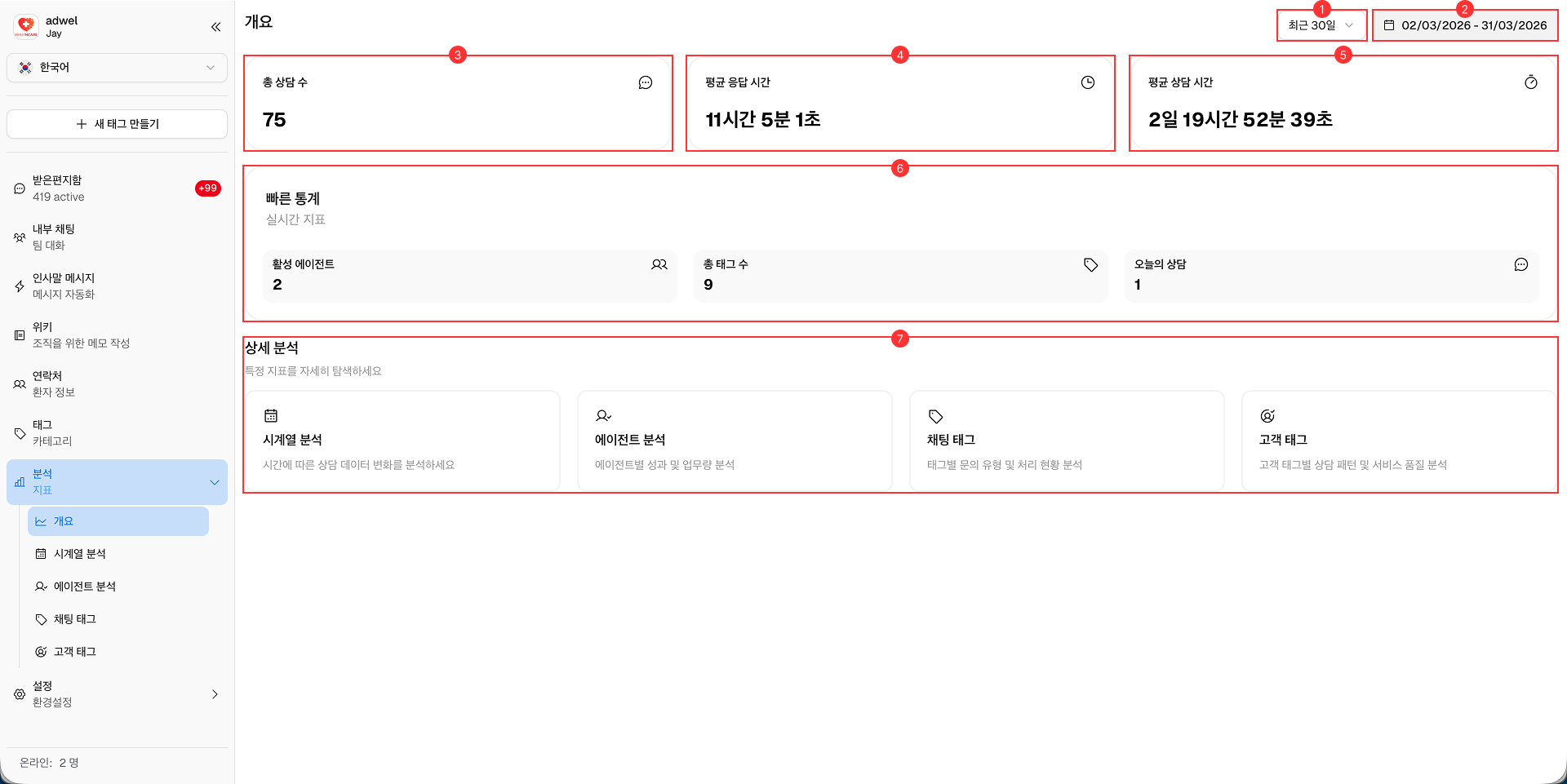
Overview Analytic 페이지는 데이터와 관련된 주요 지표 및 인사이트에 대한 포괄적인 요약을 제공합니다. 정보에 입각한 의사 결정을 내리는 데 도움이 될 수 있는 성과 지표, 트렌드 및 기타 중요 정보의 스냅샷을 빠르게 확인할 수 있도록 설계되었습니다.
-
Date Range Selector: Analytics 데이터를 볼 기간을 선택할 수 있습니다.
- 오늘 (Today)
- 지난주 (Last week)
- 지난 30일 (Last 30 days)
- 지난 90일 (Last 90 days)
- 지난 180일 (Last 180 days)
-
Date Display: Analytics 데이터에 대해 현재 선택된 날짜 범위를 보여줍니다. 사용자 지정 날짜를 선택할 때 사용할 수 있습니다.
-
Total Chats: 선택한 기간 동안 발생한 전체 Chat 수를 표시합니다.
-
Average Response Time: 선택한 기간 동안 Chat에 응답하는 데 걸린 평균 시간을 나타냅니다.
-
Average Duration: 지정된 기간 내에 진행된 Chat의 평균 Duration(지속 시간)을 보여줍니다.
-
Quick Stats: 다음을 포함한 주요 통계 요약을 **실시간(real-time)**으로 제공합니다.
- Active Agents (활성 Agent)
- Total Tags (전체 Tag 수)
- Today's Chats (오늘의 Chat)
-
Quick Links: 다른 분석 페이지로 이동할 수 있는 바로가기를 제공합니다.
- Time Series
- Agent
- Chat Tags
- Customer Tags