위젯 사용자 정의
위젯 설정 사용자 정의 페이지를 사용하면 웹 사이트에서 MChat 위젯의 모양과 동작을 다음과 같이 사용자 정의할 수 있습니다.
- 테마: 웹사이트 디자인에 맞게 채팅 위젯의 색상 테마를 선택하세요.
- 위젯 버튼: 웹사이트의 채팅 위젯 버튼 모양을 사용자 정의합니다.
- 위젯 위치: 웹사이트에서 채팅 위젯의 위치를 설정합니다. 데스크톱 보기와 모바일 보기의 위치를 별도로 설정할 수 있습니다.
이는 다음과 같은 주요 구성 요소로 구성됩니다.
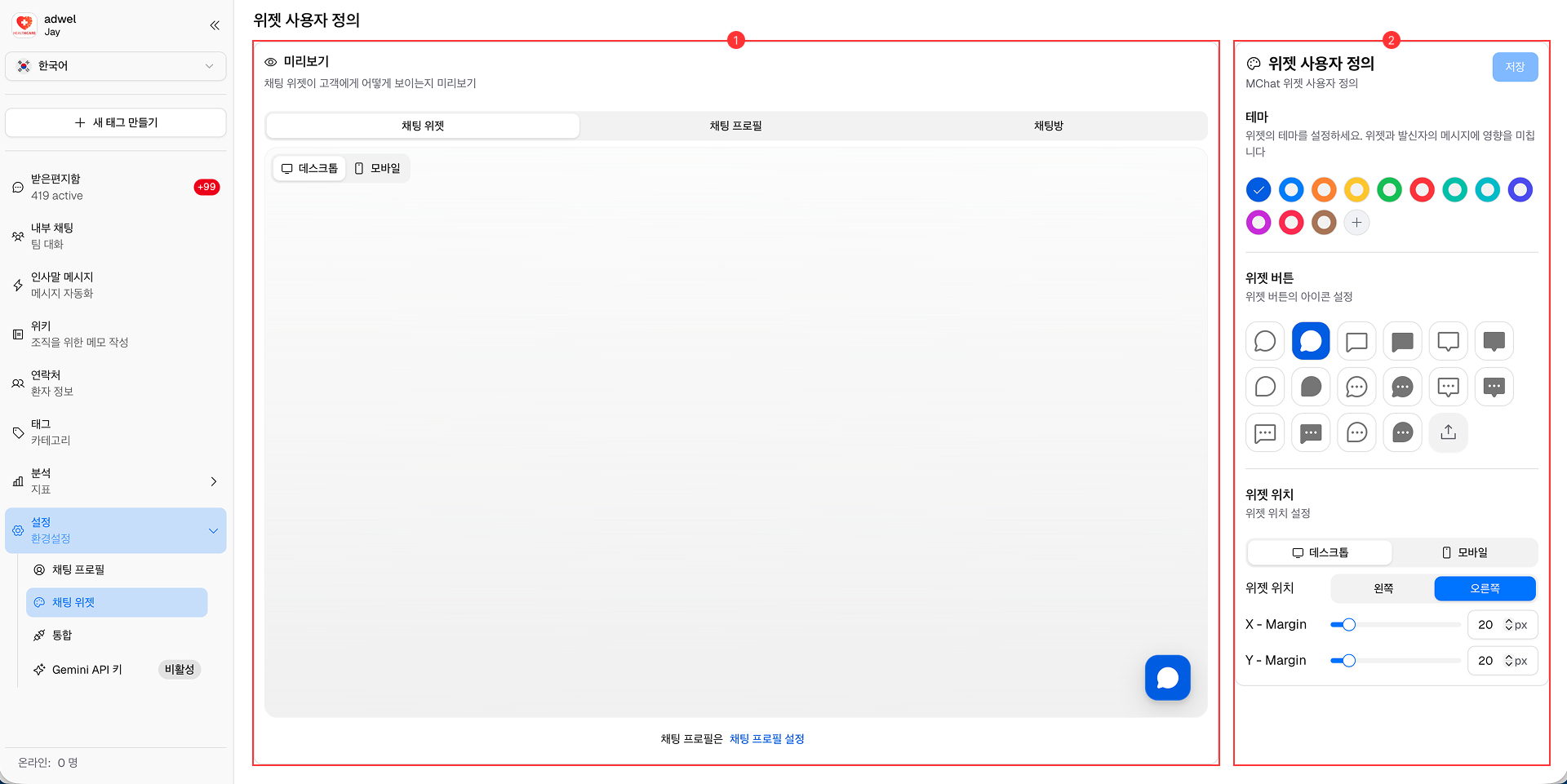
- 미리보기 섹션: 이 섹션에는 채팅 위젯이 웹사이트에 어떻게 표시되는지 실시간 미리보기가 표시됩니다. 설정을 변경하면 실시간으로 업데이트됩니다. 그것은 다음을 갖습니다:
- 3가지 구성요소 미리보기:
- 채팅 위젯: 열리지 않을 때 채팅 위젯이 어떻게 보이는지 보여줍니다.
- 채팅 프로필: 채팅 위젯이 열렸을 때 채팅 프로필이 어떻게 표시되는지 보여줍니다.
- 채팅방: 채팅 세션이 활성화되었을 때 채팅방이 어떻게 보이는지 보여줍니다.
- 2개의 미리보기 화면:
- 데스크톱: 데스크톱 보기에서 채팅 위젯을 미리 볼 수 있습니다.
- 모바일: 모바일 보기에서 채팅 위젯을 미리 볼 수 있습니다.
- 섹션 사용자 정의: 이 섹션에는 채팅 위젯의 모양과 동작을 사용자 정의할 수 있는 다양한 옵션이 포함되어 있습니다.