채팅 목록 패널
채팅 목록 패널은 내부 채팅 인터페이스의 왼쪽에 있습니다.
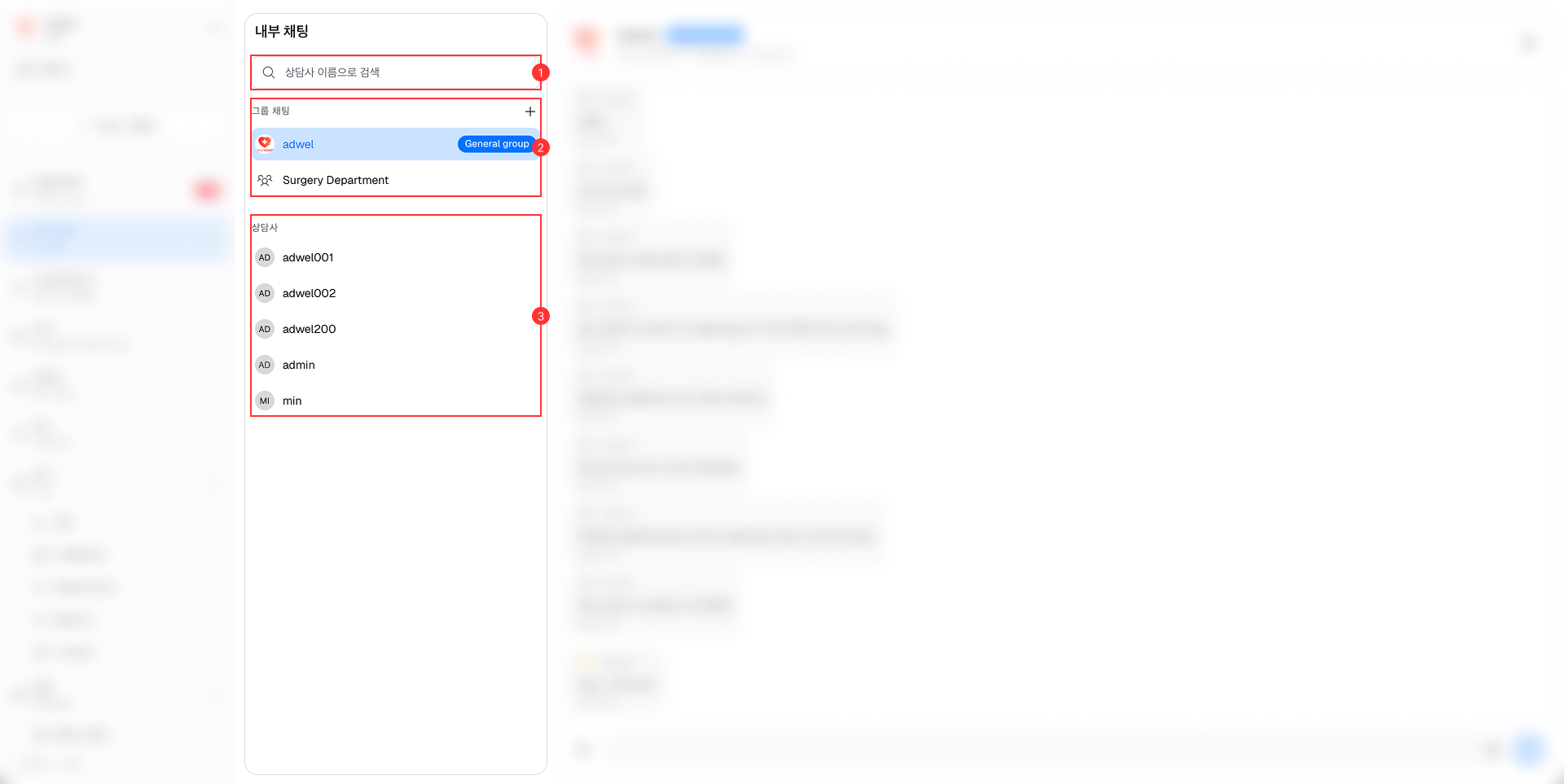
이는 다음과 같은 주요 구성 요소로 구성됩니다.
-
검색 창: 패널 상단에 있는 이 검색 창을 사용하면 상담원이 키워드나 이름을 입력하여 특정 그룹 채팅이나 개별 팀 구성원을 빠르게 찾을 수 있습니다.
-
그룹 채팅 섹션: 이 섹션에는 내부 팀 구성원과 진행 중이거나 과거의 모든 그룹 채팅 세션 목록이 표시됩니다. 각 그룹 채팅 항목에는 그룹 이름이 표시됩니다. 그룹 채팅 섹션에서:
-
개별 채팅 섹션: 이 섹션에는 내부 팀 구성원과 진행 중인 모든 개별 채팅 세션 및 과거의 개별 채팅 세션 목록이 표시됩니다. 각 개별 채팅 항목에는 팀원의 이름이 표시됩니다. 새로운 에이전트가 병원에 추가되면 자동으로 이 섹션에 나타납니다.